View split payment details for air bookings
The payment details for your air booking can be viewed on the Trips page. If you've used two payment methods to pay for a booking (e.g., paying for ancillaries using your personal card) the relevant information for both payment methods can be viewed on the Trips page.
To view split payment details for an air booking
- Select Trips from the top navigation toolbar in the Online Booking Tool. The Trips page will be displayed.
- Select the My Trips tab.
- Use the menu to select whether you would like to view upcoming or completed trips.
- Click View trip details for the trip you’d like to view. The trip's bookings will be displayed.
- Locate the air booking for which you want to view payment details (the one where you used split payment) and select Payment details from the three dots menu to the right.
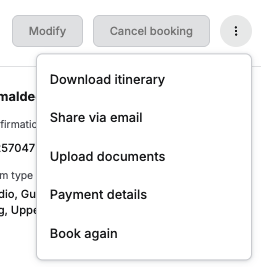
- The total fare for the booking, along with the payment methods used to make the booking, will be displayed.
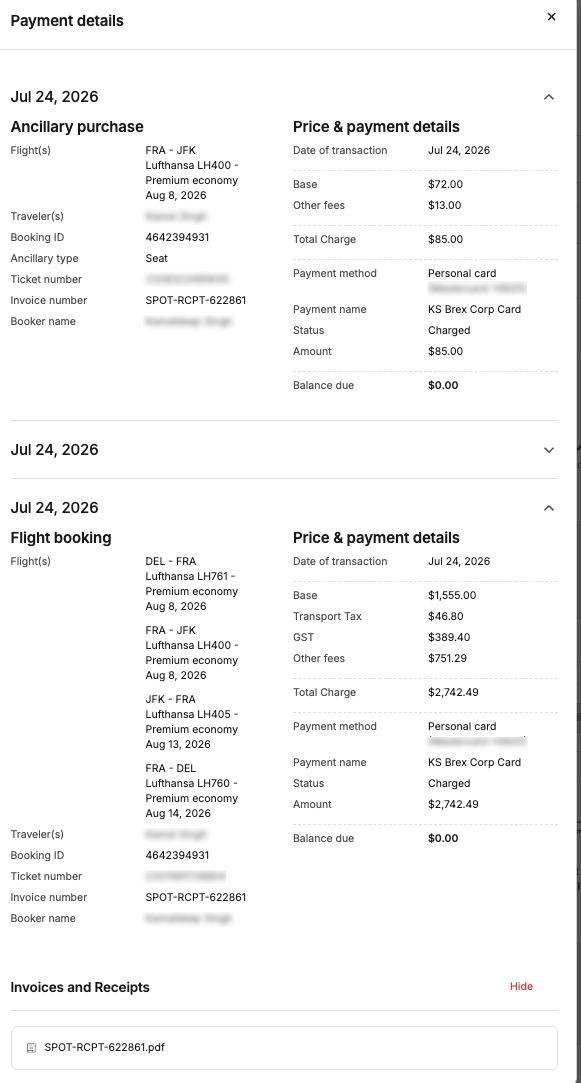
- In the Invoices and Receipts section, you can download the booking's invoice as a PDF file. This file also contains the details for each of the payment methods used.
- Separate invoices are created for the trip fee and the fares associated with the booking.
- For air bookings, a separate invoice is created for each leg booked within the trip.
- Select Download itinerary from the three dots menu on right of the booking's card to download the entire itinerary. This document will also contain details on all payment methods used under the Payment details section.
Was this article helpful?
That’s Great!
Thank you for your feedback
Sorry! We couldn't be helpful
Thank you for your feedback
Feedback sent
We appreciate your effort and will try to fix the article