Modify a rail trip (U.S./UK/EU)
Use this procedure to modify a rail booking in the U.S., UK, or Europe.
For German rail bookings: Rail bookings made with Deutsche Bahn (DB) can’t be modified. They can only be cancelled and rebooked. For instructions on how to cancel a rail booking, see Cancel a rail booking (U.S./UK/EU).
For U.S. Amtrak rail bookings: If you used your Amtrak Guest Rewards number to book your rail trip, notifications will be sent to the email address associated with your Amtrak Guest Rewards account. Any changes made directly with Amtrak will be reflected on the Trips page.
Click Trips on the main menu. The Trips page will be displayed.
Click the My trips tab.
Select Upcoming from the menu (if not already selected).
Locate the trip that contains the rail booking you wish to modify.
Click View trip details. The bookings within the trip will be displayed.
Locate the rail booking you wish to modify and click Modify.
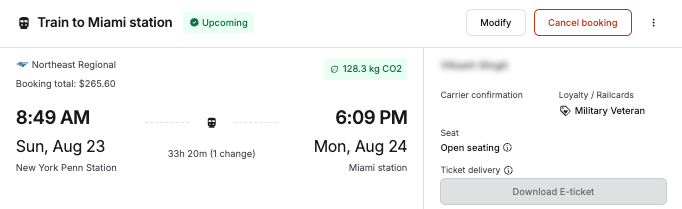
The Modify ticket(s) page will be displayed.
Select the new date and time you would like to depart as needed.
Click Continue. The system will display departure times that match the date and time you specified. You will be offered different prices for different classes of ticket.
Locate the desired class and fare and click Select. If you need to change other legs of your train booking, select new dates and times for those as well.
When done, click Continue. The Summary page will be displayed.
Review the price details (there may be additional charges) and click Next. The first Checkout page will be displayed.
Review the Change summary section to be sure it’s correct. Enter any company-specific information that may be required (e.g., Reason for Travel).
Review the terms and conditions from the rail provider and select the checkbox to indicate that you accept them.
Click Confirm modification. The Your booking is successful or Your booking will be confirmed soon page will be displayed. The details of your rail booking modification will be displayed on the Trips page. You will also be able to view the details for your previous booking.
Was this article helpful?
That’s Great!
Thank you for your feedback
Sorry! We couldn't be helpful
Thank you for your feedback
Feedback sent
We appreciate your effort and will try to fix the article