Book a rail trip (U.S./UK/EU)
Use this procedure to search for and book a rail trip in Europe, the United Kingdom, or the United States.
Any bookings you make must be associated with a trip. The system may auto-assign your booking to an existing trip or create a trip and assign the booking to it for you. You can also choose to manually create a trip beforehand via the Trips page or create the trip while making the booking.- Click Book on the main menu in the Online Booking Tool.
- Select the Rail (train) icon.
- Select the type of rail trip.
- Round trip
- One way
- Open return - This option will only appear after you have selected a from and to location that are both in the UK. It is not available outside the UK.
- Then, depending on the type of rail trip you selected:
- For Round trip: Enter your Where from and Where to locations. Enter your Outbound and Return dates and times.
- For One way: Enter your Where from and Where to locations. Enter your Outbound date and time.
- For Open return (UK only): Enter your Where from and Where to locations. Enter your Outbound date and time.
Expand the traveler panel and click Add rail card to select any applicable rail or discount cards. Any relevant discounts will be applied. You may be required to physically present any rail or discount cards you select here during your rail journey.
To add additional travelers, expand the traveler panel and click Add travelers. See the country-specific requirements for additional travelers below.
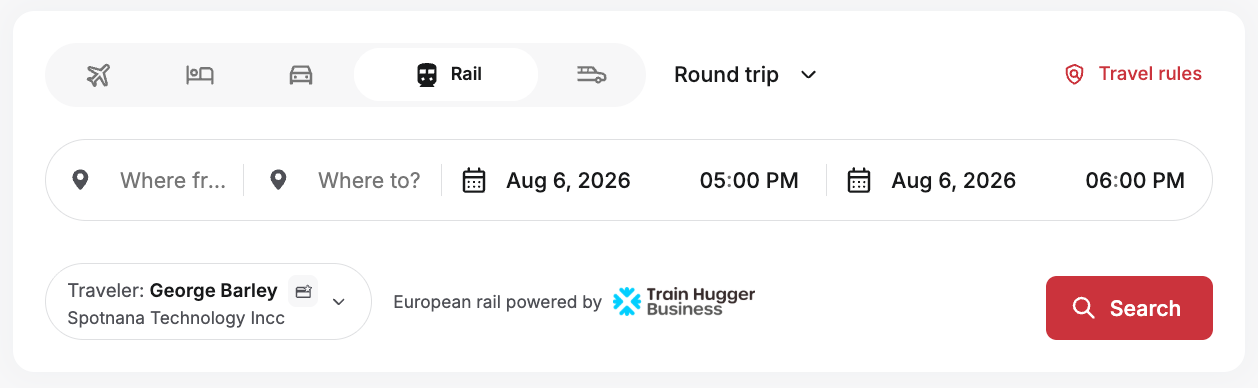
Click Search. The Outbound page will show rail options that match the criteria you entered. The fares are organized into fare class columns (e.g., Standard, 1st class). You can also view earlier or later departure options.
To expand and view the options for a particular fare class, click the price. This will display the various ticket types (e.g., Lowest, Semi-flexible, Flexible) available for that class of travel. For an explanation of each ticket type, click the info icon next to it.
Click Select to select a particular ticket type.
Click Continue to proceed with your booking. If you are booking a round trip rail journey, you will repeat the fare selection process for the return trip. Once ticket types have been selected for all portions of your trip, the Summary page will be displayed.
The Summary page allows you to verify your rail trip details and prices, review and update traveler information and contact details, specify seat preferences, and purchase any extras or city-specific travel cards that may be available (depending on the city you are traveling to). Review and update this information as needed.
Click Next. The second Summary page will be displayed.
The second Summary page will show a detailed price for the rail booking. This is also where you can:
select a trip for your rail booking (in most cases, the system will auto-assign your booking to a trip for you). You can also select an existing trip or create a new one.
select a payment method. In some cases, a default payment method may already be selected or your company may only allow specific payment methods to be used.
review the details for ticket delivery.
review your rail itinerary.
enter any company-specific information that may be required (e.g., Reason for Travel).
Select the checkbox to confirm that you have read and accept the rail carrier's conditions for travel.
When you are ready to complete your booking, click Confirm and Pay. Your selected rail trip will be booked.
You will receive an email confirmation of your rail booking.
Additional details for multi-passenger bookings
You can make multi-passenger rail bookings. However, depending on the rail network on which you are making the booking, there may be certain restrictions and requirements for these types of bookings:
UK: You can make multi-passenger rail bookings for up to 9 passengers at a time. Only the Primary Traveler must be specified on the booking. The other passengers can be added as Additional Travelers (e.g., Adult, Senior).
Spain, France, Germany, Switzerland, Italy, Netherlands, and Belgium: You can make multi-passenger rail bookings for up to 9 passengers at a time. All travelers must have profiles in the system. Use the Primary Traveler and Stored Travelers fields in the traveler panel section to select the desired travelers. In addition, there are some additional requirements for the following countries.
For Spain: Each traveler must have a form of ID associated with the booking (ID card for Spanish residents, passport for non-Spanish nationals).
For France and Switzerland: Each passenger must have their date of birth specified in the booking (either in their profile or during checkout).
For Germany: A title (Mr. Mrs., or Miss) must be specified for each traveler in the booking (either in their profile or during checkout).
Was this article helpful?
That’s Great!
Thank you for your feedback
Sorry! We couldn't be helpful
Thank you for your feedback
Feedback sent
We appreciate your effort and will try to fix the article